Apple Mac mini (Late 2014) vs Apple Mac mini (M6 or M5 Pro)
Better figure, where one is clearly better
| AppleMac mini (Late 2014) | AppleMac mini (M6 or M5 Pro) | |
|---|---|---|
| Overview | ||
| Released | October 2014 | September 2026 |
| Performance | ||
| Processor | Intel Core i5-4260U, Intel Core i5-4278U, Intel Core i5-4308U or Intel Core i7-4578U | Apple M6 or Apple M5 Pro |
| CPU cores | 2 | 12, 15 or 18 |
| CPU threads | 4 | – |
| Graphics | Intel HD Graphics 5000 or Intel Iris Graphics 5100 | 12-core GPU, 16-core GPU or 20-core GPU |
| Memory | 4 GB, 8 GB or 16 GB | 16 GB, 24 GB, 32 GB, 48 GB or 64 GB (better) |
| Storage | 256 GB to 2 TB | 256 GB to 8 TB (better) |
| CPU | 1.4 GHz dual-core Core i5 (Turbo Boost up to 2.7 GHz), 2.6 GHz dual-core Core i5 (up to 3.1 GHz), or 2.8 GHz dual-core Core i5 (up to 3.3 GHz). The two higher models can be configured with a 3.0 GHz dual-core Core i7 (up to 3.5 GHz). Exact processor identities are recorded by Geekbench; Ars Technica tested the Core i5-4278U and Macworld tested the Core i5-4308U. | M6: 12-core CPU with 2 super cores, 4 performance cores and 6 efficiency cores; M5 Pro: 15-core CPU with 5 super cores and 10 performance cores, or 18-core CPU with 6 super cores and 12 performance cores |
| GPU | Intel HD Graphics 5000 in the 1.4 GHz model; Intel Iris Graphics 5100 in the 2.6 GHz, 2.8 GHz and optional Core i7 models | Neural Accelerators; hardware-accelerated ray tracing |
| AI engine | – | Dual 16-core Neural Engine (M6); 16-core Neural Engine (M5 Pro) |
| Memory bandwidth | – | M6: 153GB/s with 16GB, 170GB/s with 24GB or 32GB; M5 Pro: 307GB/s |
| Memory type | 1600 MHz LPDDR3 soldered to the logic board; 4 GB configurable to 8 GB or 16 GB on the 1.4 GHz model, and 8 GB configurable to 16 GB on the higher models. Memory cannot be upgraded after purchase (Ars Technica). | – |
| Storage type | 1.4 GHz model has a 500 GB 5400-rpm hard drive or 1 TB Fusion Drive. The 2.6 GHz model has a 1 TB hard drive, 1 TB Fusion Drive or 256 GB SSD. The 2.8 GHz model has a 1 TB Fusion Drive, later 2 TB Fusion Drive option, or 256 GB, 512 GB or 1 TB SSD. Core i7 configurations retain the storage choices of their original base model; deduplicated configurations combine these supported choices. Macworld reports the 2 TB Fusion Drive option was added after launch; it is included in Apple's current specification. | SSD |
| Media engine | – | Hardware-accelerated H.264, HEVC, ProRes and ProRes RAW; video decode engine; video encode engine; ProRes encode and decode engine; AV1 decode |
| Display | ||
| Screen | None built in | None built in |
| Connections | ||
| Ports | 2 × Thunderbolt 2, 4 × USB-A, HDMI, SD card slot, Ethernet, headphone jack | 3 × Thunderbolt 4, 2 × USB-C, HDMI, Ethernet, headphone jack |
| Ethernet | 1 Gb/s | 2.5 Gb/s (better) |
| External displays | Up to 2 | Up to 3 (better) |
| Wi-Fi | 802.11ac | Wi-Fi 7 |
| Bluetooth | 4.0 | 6 |
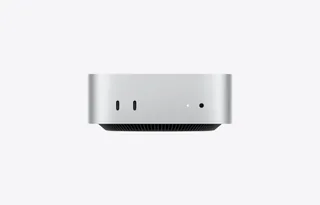
| Front ports | – | 2 × USB-C with USB 3 (up to 10Gb/s); 3.5 mm headphone jack with advanced support for high-impedance headphones |
| Back ports | Two Thunderbolt 2 ports up to 20 Gb/s each, four USB 3 ports up to 5 Gb/s, HDMI, SDXC slot, Gigabit Ethernet, separate digital/analogue audio input and headphone/line output; IR receiver | M6: 3 × Thunderbolt 4 (USB-C) with Thunderbolt 4 and USB 4 (up to 40Gb/s) and DisplayPort; M5 Pro: 3 × Thunderbolt 5 (USB-C) with Thunderbolt 5 (up to 120Gb/s), USB 4 (up to 40Gb/s) and DisplayPort; HDMI with multichannel audio output; 2.5Gb Ethernet (RJ-45), configurable to 10Gb Ethernet |
| External displays | Up to two displays at 2560 × 1600; native Mini DisplayPort output over Thunderbolt. HDMI supports 1080p at up to 60 Hz, 3840 × 2160 at 30 Hz or 4096 × 2160 at 24 Hz. DVI, VGA and dual-link DVI require the appropriate adapter. | M6: up to three (two at up to 6K 60Hz or 4K 165Hz, plus a third at up to 5K 60Hz over Thunderbolt or 4K 60Hz over HDMI), or two (one at up to 8K 60Hz, 5K 120Hz or 4K 240Hz, plus one at up to 5K 60Hz over Thunderbolt or 4K 60Hz over HDMI); M5 Pro: up to three at up to 6K 60Hz or 4K 165Hz, or two (one at up to 8K 60Hz, 5K 120Hz or 4K 240Hz, plus one at up to 5K 120Hz or 4K 200Hz); VRR and HDR supported |
| Speakers | Built-in speaker; HDMI supports multichannel audio; supports Apple iPhone headset with microphone | Built-in speaker |
| Microphones | – | None built in; Apple says an external microphone or headset is needed for calls |
| Keyboard and mouse | Power lead; monitor, keyboard and mouse sold separately | – |
| Design and power | ||
| Type | Compact | Compact |
| Weight | – | 0.67 kg |
| Width × depth × height | 197 × 197 × 36 mm | 127 × 127 × 50 mm |
| Operating system | macOS | macOS |
| Size and weight detail | 197 × 197 × 36 mm; 1.19 kg for the 1.4 GHz model, 1.20 kg for the 2.6 GHz model and 1.22 kg for the 2.8 GHz model. Weight varies by configuration and manufacturing process; no common weight is assigned. | – |
| Power supply | Integrated power supply; 100–240 V AC, 50–60 Hz; maximum continuous power 85 W | Built-in; 100–240V AC; 155W maximum continuous power |
| Power use | – | M6 with 16GB and 256GB: 4W idle, 70W maximum; M5 Pro with 64GB and 8TB: 6W idle, 145W maximum |
| Noise | Apple specifies 12 dBA sound pressure at idle; its acoustic test configuration is the 2.8 GHz Core i5 with 8 GB memory and 1 TB Fusion Drive | 5 dBA sound pressure at idle (operator position); declared to ECMA-109 as 1.3 B sound power and 4 dB sound pressure at idle and wireless web (M5 Pro, 18-core CPU, 20-core GPU) |
| Materials | Recyclable aluminium enclosure; BFR-free and PVC-free with regional power-lead exceptions | 100% recycled aluminium enclosure; 50% recycled content overall |
| Colours | – | Silver |
| In the box | Mac mini and power lead; shipped with OS X Yosemite at launch. The current support sheet's macOS Mojave wording reflects a later software update. | Mac mini, power lead (1.8 m) |

More comparisons
- Apple Mac mini (M1) vs Apple Mac mini (M6 or M5 Pro)
- Apple Mac mini (2018) vs Apple Mac mini (M6 or M5 Pro)
- Apple Mac mini (Early 2009) vs Apple Mac mini (M6 or M5 Pro)
- Apple Mac mini (M6 or M5 Pro) vs Apple Mac mini (Mid 2010)
- Apple Mac mini (Early 2006) vs Apple Mac mini (M6 or M5 Pro)
- Apple Mac mini (2005) vs Apple Mac mini (M6 or M5 Pro)
- Apple Mac mini (M6 or M5 Pro) vs Apple Mac mini (Mid 2007)
- Apple Mac mini (M4 or M4 Pro) vs Apple Mac mini (M6 or M5 Pro)
- Apple Mac mini (M6 or M5 Pro) vs Framework Desktop (AMD Ryzen AI Max 300 Series)
- Apple Mac mini (M2 or M2 Pro) vs Apple Mac mini (M6 or M5 Pro)
- Apple Mac mini (Late 2012) vs Apple Mac mini (M6 or M5 Pro)
- Apple Mac mini (M6 or M5 Pro) vs Apple Mac mini (Mid 2011)
- Apple Mac mini (M6 or M5 Pro) vs Apple Mac Studio (M5 Max or M5 Ultra)
- Apple Mac mini (Late 2009) vs Apple Mac mini (M6 or M5 Pro)
- Apple Mac mini (Late 2006) vs Apple Mac mini (M6 or M5 Pro)
- Apple Mac mini (Late 2014) vs Apple Mac mini (M4 or M4 Pro)