Apple Mac Pro (Late 2013) vs Apple Mac Studio (M1 Max / M1 Ultra)
Better figure, where one is clearly better
| AppleMac Pro (Late 2013) | AppleMac Studio (M1 Max / M1 Ultra) | |
|---|---|---|
| Overview | ||
| Released | December 2013 | March 2022 |
| Performance | ||
| Processor | Intel Xeon E5-1620 v2, Intel Xeon E5-1650 v2, Intel Xeon E5-1680 v2 or Intel Xeon E5-2697 v2 | Apple M1 Max or Apple M1 Ultra |
| CPU cores | 4, 6, 8 or 12 | 10 or 20 |
| CPU threads | 8, 12, 16 or 24 | – |
| Graphics | Dual AMD FirePro D300 (2 GB GDDR5 each), Dual AMD FirePro D500 (3 GB GDDR5 each) or Dual AMD FirePro D700 (6 GB GDDR5 each) | 24-core GPU, 32-core GPU, 48-core GPU or 64-core GPU |
| AI engine (NPU) | – | 22 TOPS |
| Memory | 12 GB, 16 GB, 32 GB or 64 GB | 32 GB, 64 GB or 128 GB (better) |
| Storage | 256 GB to 1 TB | 512 GB to 8 TB (better) |
| CPU | 3.7 GHz quad-core, 3.5 GHz six-core, 3.0 GHz eight-core or 2.7 GHz twelve-core Intel Xeon E5. Exact identities are E5-1620 v2, E5-1650 v2, E5-1680 v2 and E5-2697 v2, cross-checked against Geekbench device records and Ars hardware testing; Intel specifications supply thread counts and maximum Turbo frequencies. | M1 Max has 10 CPU cores (8 performance, 2 efficiency); M1 Ultra has 20 (16 performance, 4 efficiency) |
| GPU | Dual AMD FirePro D300 with 2 GB GDDR5 per GPU, D500 with 3 GB per GPU, or D700 with 6 GB per GPU. Memory is specified separately for each GPU, rather than pooled. All graphics options are available by upgrading the original quad-core base configuration. | M1 Max has 24 or 32 GPU cores; M1 Ultra has 48 or 64 |
| AI engine | – | 16-core Neural Engine (M1 Max); 32-core Neural Engine (M1 Ultra) |
| Memory bandwidth | – | 400 GB/s (M1 Max); 800 GB/s (M1 Ultra) |
| Memory type | Four user-accessible slots for 1866 MHz DDR3 ECC memory; 12 GB (three 4 GB modules), 16 GB (four 4 GB), 32 GB (four 8 GB) or 64 GB (four 16 GB) | – |
| Storage type | PCIe-based SSD; 256 GB, 512 GB or 1 TB. No internal hard-drive bays or optical drive. | SSD; M1 Max starts at 512 GB, configurable to 1 TB, 2 TB, 4 TB or 8 TB; M1 Ultra starts at 1 TB with 2 TB, 4 TB or 8 TB options |
| Media engine | – | Hardware-accelerated H.264, HEVC, ProRes and ProRes RAW; M1 Max has one video decode, two video encode and two ProRes engines; M1 Ultra has two video decode, four video encode and four ProRes engines |
| Expansion slots | No internal PCIe card slots; peripherals and compatible external expansion chassis connect through Thunderbolt | – |
| Display | ||
| Screen | None built in | None built in |
| Connections | ||
| Ports | 4 × USB-A, 6 × Thunderbolt 2, 2 × Ethernet, HDMI, headphone jack | 4 × Thunderbolt 4, 2 × USB-C, 2 × USB-A, HDMI, Ethernet, SD card slot, headphone jack |
| Ethernet | 1 Gb/s | 10 Gb/s (better) |
| External displays | Up to 6 (better) | Up to 5 |
| Wi-Fi | 802.11ac | Wi-Fi 6 |
| Bluetooth | 4.0 | 5.0 |
| Front ports | – | Two USB-C ports up to 10 Gb/s (M1 Max) or two Thunderbolt 4 ports up to 40 Gb/s (M1 Ultra); SDXC slot with UHS-II support |
| Back ports | Four USB 3 USB-A ports, six Thunderbolt 2 ports, two Gigabit Ethernet ports, HDMI 1.4 Ultra HD, 3.5 mm headphone jack with headset support, and a separate combined optical digital audio output/analogue line-out minijack. Thunderbolt ports are divided across three controllers, as explained in Macworld and Ars reviews. | Four Thunderbolt 4 ports with DisplayPort, Thunderbolt 4 and USB 4 up to 40 Gb/s, and USB 3.1 Gen 2 up to 10 Gb/s; two USB-A up to 5 Gb/s; HDMI; 10 Gb Ethernet supporting 1, 2.5, 5 and 10 Gb/s; 3.5 mm jack with high-impedance headphone support |
| External displays | Apple's current support specifications allow six Thunderbolt displays or three dual-cable 5K displays. The launch announcement specified support for three 4K displays; the later 5K statement should not be read as launch-day capability. | Four displays at up to 6K 60 Hz over USB-C and one at up to 4K 60 Hz over HDMI, simultaneously |
| Speakers | Built-in speaker; HDMI supports multichannel audio output | Built-in speaker; HDMI multichannel audio output |
| Keyboard and mouse | Keyboard, mouse and display sold separately | – |
| Design and power | ||
| Type | Compact | Compact |
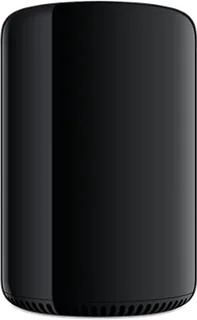
| Weight | 5 kg | 2.7 kg (better) |
| Width × depth × height | 167 × 167 × 251 mm | 197 × 197 × 95 mm |
| Operating system | macOS | macOS |
| Size and weight detail | Cylindrical enclosure; 251 mm high and 167 mm in diameter, with 5 kg weight from Apple's Japanese specification sheet. Weight varies by configuration and manufacturing process. | Weight is 2.7 kg with M1 Max or 3.6 kg with M1 Ultra; both enclosures are 197 × 197 × 95 mm |
| Power supply | 100–240 V AC, 50–60 Hz, single phase; maximum continuous power 450 W | Built-in; 100–240 V AC, 50–60 Hz; maximum continuous power 370 W |
| Noise | Apple's overview reports 12 dBA operator-position sound pressure at idle, while the acoustic table reports 14 dB at idle and 14.5 dB during wireless web. These are conflicting maker statements; no single noise value is selected. | 15 dBA sound pressure at idle and during Apple's wireless web test (M1 Ultra, operator position) |
| Materials | Highly recyclable enclosure; BFR-free and PVC-free, with regional exceptions for the power lead | 80% recycled aluminium enclosure |
| Colours | – | Silver |
| In the box | Mac Pro and power lead. Launched with OS X Mavericks; the current support page describes the later macOS Mojave release. Original standard configurations were quad-core with 12 GB memory and D300 graphics, and six-core with 16 GB and D500. The current support sheet also lists an eight-core standard configuration with 16 GB and D700. Configurations below include independent processor, memory, graphics and storage upgrades of the original quad-core base, so 12 GB or D300 with a higher-core processor represents a customised base model. | Mac Studio, power lead |

More comparisons
- Apple Mac Studio (M1 Max / M1 Ultra) vs Apple Mac Studio (M5 Max or M5 Ultra)
- Apple Mac Studio (M1 Max / M1 Ultra) vs Framework Desktop (AMD Ryzen AI Max 300 Series)
- Apple Mac Studio (M1 Max / M1 Ultra) vs Apple Mac Studio (M4 Max or M3 Ultra)
- Apple Mac Pro (Late 2013) vs Apple Mac Studio (M4 Max or M3 Ultra)
- Apple Mac mini (M4 or M4 Pro) vs Apple Mac Pro (Late 2013)
- Apple Mac mini (M4 or M4 Pro) vs Apple Mac Studio (M1 Max / M1 Ultra)
- Apple Mac Pro (Late 2013) vs Apple Mac Pro (M2 Ultra)
- Apple Mac Pro (M2 Ultra) vs Apple Mac Studio (M1 Max / M1 Ultra)
- Apple Mac Studio (M1 Max / M1 Ultra) vs Apple Mac Studio (M2 Max or M2 Ultra)
- Apple iMac Pro (2017) vs Apple Mac Studio (M1 Max / M1 Ultra)
- Apple Mac Pro (2019) vs Apple Mac Pro (Late 2013)
- Apple Mac mini (2018) vs Apple Mac Pro (Late 2013)
- Apple iMac Pro (2017) vs Apple Mac Pro (Late 2013)
- Apple Mac mini (Late 2014) vs Apple Mac Pro (Late 2013)
- Apple Mac Pro (Late 2013) vs Apple Mac Pro (Mid 2010)
- Apple Mac Pro (Late 2013) vs Apple Mac Pro (Mid 2012)